The following is a list of new things out there in the Cisco NAC World. The NAC Market is continuing to grow in 2009 and with the growth the products will continue to evolve, get better and have more options.
Security Options Abound: New NAC Release
My friends over at TechWiseTV are a huge multi-media machine, producing video, audio and podcasts. Well this PodCast is on NAC 4.5, Alok Agrawal of the NAC Business Unit and Myself dive into some of the cool features of 4.5. All of the podcasts can be subscribed to through iTunes.
To access the NAC podcast go to:
http://www.cisco.com/en/US/solutions/ns340/ns339/ns638/ns719/html_TW/tw_episode_198.html
And to get more information on all the great stuff coming from Techwise TV visit:
http://www.mytechwisetv.com/
or
http://cisco.com/go/interact
NAC Layer 3 Out of Band Design Guide That Uses VRF-Lite for Traffic Isolation
Cisco wrote a new configuration guide on using VRF-Lite for traffic isolation. This is a great configuration option for NAC, but with that said never re-design your network just for NAC. VRFs can become very complex and introducing new technology into the network should be carefully planned. Using VRFs in a enterprise network does make sense, but the reasons for moving to the new network design should be a combination of the added features/benefits for Security(NAC, Guest Access, Wireless, etc.) and Network managebility, throughput, and scalability.
http://www.cisco.com/en/US/products/ps6128/products_configuration_example09186a0080a3a8a7.shtml
New NAC Profiler Release
Last month a new maintenance release of Cisco NAC Profiler came out. 2.1.8-38 brings a good list of BugFixes and minor enhancements.
One Minor Enhancement that made it was Endpoint and Directory Timeout Unified Into Endpoint Timeout, which gives us more control on how to age out endpoints out of the database.
Find all the Fixes and information in the Release Notes.
The Release Notes can be found:
http://www.cisco.com/en/US/docs/security/nac/profiler/release_notes/218/218rn.html#wp101317
The new software can be download at:
http://www.cisco.com/cgi-bin/tablebuild.pl/nacprofiler-2.1.8 (Requires Valid Smartnet Contract)
Showing posts with label Tutorial. Show all posts
Showing posts with label Tutorial. Show all posts
Thursday, January 22, 2009

Tuesday, November 18, 2008
NAC Support Logs in 4.5
Many people might be wondering what happen to the handy dandy support logs that used to be located in the "/perfigo/logs/" directory in previous NAC versions. Well in version 4.5 there were some enhancements to the logging and with those enhancements came new placement of the logs.
These logs are most commonly used to troubleshoot NAC during deployments. Please do not turn on advanced logging without reading the documentation fully or with the assistance of Cisco TAC.
The CAM log can be found at:
/perfigo/control/tomcat/logs/nac_manager.log
The CAS log can be found at:
/perfigo/access/tomcat/logs/nac_server.log
For those of you not familiar with what the logs contain, please feel free to reference the CAM and CAS Configuration Guides:
CAM Admin Guide - Support Logs
CAS Admin Guide - Support Logs
These logs are most commonly used to troubleshoot NAC during deployments. Please do not turn on advanced logging without reading the documentation fully or with the assistance of Cisco TAC.
The CAM log can be found at:
/perfigo/control/tomcat/logs/nac_manager.log
The CAS log can be found at:
/perfigo/access/tomcat/logs/nac_server.log
For those of you not familiar with what the logs contain, please feel free to reference the CAM and CAS Configuration Guides:
CAM Admin Guide - Support Logs
CAS Admin Guide - Support Logs
Thursday, November 13, 2008
NAC Version Matrix
In June of 2006, NAC Version 4.0.0 was released. Since then, Cisco has released numerous updates and features to the NAC Appliance line! Recently a member of the NAC Mailing List posted the following request:
Is there a feature matrix to compare the various versions/tracks of
Cisco NAC?
So that is exactly what this posts answers. It is long, but I know at least one person appreciates it!
I will explore 3 major lines of code.. 4.0.X, 4.1.X and 4.5.X. Realistically all new deployments should be using 4.1.X or 4.5.X, but I wanted to give a good overview for everyone on older codes.
4.0.X
4.0.0
4.1.X
4.1.0
4.1.1
4.5.X
4.5.0
Bottom Line, I recommend 4.1.6 for any new deployment that does require any of the features of 4.5.X
Is there a feature matrix to compare the various versions/tracks of
Cisco NAC?
So that is exactly what this posts answers. It is long, but I know at least one person appreciates it!
I will explore 3 major lines of code.. 4.0.X, 4.1.X and 4.5.X. Realistically all new deployments should be using 4.1.X or 4.5.X, but I wanted to give a good overview for everyone on older codes.
4.0.X
4.0.0
- Support for Active Directory (Windows Domain) Single Sign-On (SSO)
- Corporate Asset Authentication and Posture Assessment by MAC Address
- Support for Layer 3 Out-of-Band (OOB) Deployment
- New Windows Update Requirement Type
- SMP Kernel Support for Super CAM
- Support for Assigning VLANs by VLAN Name in OOB Deployments
- Support for "IGNORE" Global Device Filter for IP Phones in OOB Deployments
- Ability to Change Priority of Wildcard/Range Global Device Filters
- Ability to View or Search Active L2 Devices in Device Filter List
- Ability to Test MAC Addresses Against Device Filters
- Support for Relay IP Class Restrictions on DHCP Server
- Support for DHCP Global Actions
- New "service perfigo maintenance" CLI Command for CAS
- Ability of Clean Access Agent to Send IP/MAC for All Available Adapters
- Support for Stub Installation/Update of the Clean Access Agent
- OOB Page Redirection Timers (SNMP Receiver Advanced Settings)
- SNMP Enhancements for CAM
- CAS Host-Based Traffic Policy Enhancements for Proxy Servers
- Enhancements for DHCP Option Configuration Forms
- Authentication Cache Timeout
- Enable L3 Strict Mode
- OOB Support for 3750 NME Modules for Cisco 2800/3800 ISRs
- Link-Failure Based Failover in CAS HA
- Upgrade Enhancements
- CAM Disable Serial Login
- CAM Admin Console Login Enhancements
- Client OS Detection Signature Lookup
- Start Timer Specification for Cisco Updates
- API Enhancements
- Enhancements for Windows XP Media Center Edition/Tablet PC
- Restricted Network Access Option for Clean Access Agent Users
- Daylight Savings Time Support
- Support for Windows Vista Operating System
- License Manager Support for Cisco Clean Access Lite, Standard, and Super Managers
- Improved Memory Footprint for Clean Access Agent Reports
- Broadcast ARP Server Management Option Removed
- Kernel Upgrade
- Debug Log Download Enhancement
- Syslog Configuration Enhancement
4.1.X
4.1.0
- CAS Policy Fallback
- Clean Access Agent/ActiveX/Applet DHCP Release/Renew
- Support for GPO Update Trigger
- Online Update to Retrieve Switch OIDs
- Qualified Remediation Program Launch
- Clean Access Agent for Mac OS X Authentication
- Clean Access Agent Installation Options
- Clean Access Agent Language Template Support
- Clean Access Agent Silent Auditing
- Searchable Clean Access Agent Reports
- Certified Devices Timer Enhancements for Periodic Assessment
- DHCP Renewal Enhancements
- DHCP Subnet List Enhancements
- DHCP Global Option Enhancements
- IE 7.0 Support
- Clean Access Agent Enhancements (4.1.0.0)
- Port Profile Management for OOB Users
- Enhancements to Check Parameters
- Daylight Savings Time Support
- Supported AV/AS Product List Enhancements (Version 42)
- Deprecated IPsec/L2TP/PPTP/PPP Features
- Deprecated Roaming Features
4.1.1
- Support for Windows Vista Operating System
- RADIUS Challenge-Response Support
- Layer 2 Traffic Policy Support
- Multiple Active Directory Server Support in AD SSO
- Restricted Administrator Web Console Options Hidden from View
- Proxy Server Basic/Digest/NTLM Authentication Support
- VLAN Profiles
- VLAN Pruning
- Event Logs Enhancement
- Agent Report Retrieval API Operation
- Out-of-Band IP Refresh Enhancement
- Switch Port Configuration Enhancements
- SNMP Receiver Settings Enhancement
- Support for Windows Vista Operating System
- Windows Update Upon Agent Login
- Agent Reports Show System and User Information
- Agent IP Address Refresh/Renew Enhancement
- CAS-Agent Discovery (SWISS) Enhancements
- 4.1.0.x Agent Support on Release 4.1(1)
- MAC OS RADIUS Challenge-Response Support
- MAC OS Automatically Close Message Dialog After Successful Login
- MAC OS IP Refresh Support for Out-of-Band Deployments
- MAC OS Allow Only One Mac OS Agent to Run on the Client at a Time
- Cisco NAC Appliance Integration with Cisco NAC Profiler/Collector Solution
- New Cisco NAC Network Module (NME-NAC-K9) Support
- NAC Appliance Platform Type Display
- Debug Log Download Enhancement
- Active VPN Client Status Page Enhancement
- WSUS Requirement Configuration Display Enhancement
- New "service perfigo platform" CLI Command
- Web Login Support Using Safari Browser for Mac OS
- Windows Clean Access Agent Language Template Support Enhancement
- Cisco NAC Web Agent
- Support for Clients with Multiple Active NICs
- Clean Access Server HA Heartbeat Link Enhancement
- Clean Access Manager HA Configuration and Heartbeat Link Enhancements
- Guest User Login and Registration Enhancements
- LDAP Authentication Enhancement
- Clean Access Server and WSUS Interaction Enhancement
- Agent Restricted User Access Enhancement
- Device Filter List Display and Import/Export Enhancement
- Agent Report Information Display and Export Enhancement
- VPN SSO Login Enhancement
- VPN SSO Enhancement to Support Existing Clientless SSL VPN Users Launching the AnyConnect Client from a WebVPN Portal
- Syslog Configuration Enhancement
- Debug Log Download Enhancement
- cisco_api.jsp Enhancement
- CSRF Protection
- Proxy Support Enhancements
- ARP Broadcast Packet Handling Improvement
- Clean Access Server HA ARP Broadcast Enhancement
- Deprecated "Retag Trusted-side Egress Traffic with VLAN (In-Band)" Feature
- Previously-Deprecated Features Removed from CAM/CAS Web Console Pages
- Clean Access Agent Auto Remediation
- Delay Agent Logoff on CAM/CAS
- 64-bit Windows Operating System Agent Support
- Access to Authentication VLAN Change Detection Enhancement
- SNMP Inform Notification Enhancement
- SNMP "MAC Move Notification" Switch Port Configuration Support
- Trusted Certificate Authority Enhancement for Production Environments
- Enhanced CAM/CAS Web Console Features Certificate Warning Messages
- Ability to View and Remove Certificate Authorities from CAM/CAS Without Rebooting
- Enhanced Security with Server Identity Based Authorization
- JMX Over SSL Secured with Mutual Authentication
- HTTPS Connections Enhanced with Mutual Authentication
- Features Optimized/Removed
4.5.X
4.5.0
- Policy Import/Export
- CAM/CAS SSL Certificate Management Enhancement
- CAM/CAS Software Upload Page Enhancements
- Database Snapshot Upgrade Enhancement
- Clean Access Manager High Availability User Interface Enhancement
- CAM/CAS Support Log Level Settings Enhancement
- CAM/CAS High Availability Configuration Able to Detect Hard-Drive Failure
- Support for Wireless Out-of-Band Deployments
- Assign Restricted VLAN for OOB Client Machines When Disconnected
- Certified Device List/Online User List Enhancements
- Out-of-Band Shield Enhancement
- Out-of-Band Discovered Clients Cleanup
- Pre-Login Banner
- Strong Password Support for Root Admin Users
- External Authentication Server Support for Web Administrator Login
- Support for Cisco NAC Appliance/NME-NAC Platforms Only
- Web Upgrade Support Removed
- Default CAM Web Console Password Removed
- Windows ME/98/NT OS Support Removed
Bottom Line, I recommend 4.1.6 for any new deployment that does require any of the features of 4.5.X
Monday, October 20, 2008
Configuration Example - Wireless Out Of Band - New NAC 4.5 Feature
The following is a configuration guide that was posted to explain how to configure NAC 4.5 with Wireless LAN Controller 5.1 for NAC Wireless OOB support.
Wireless OOB is a feature we all have been waiting for. Some of the great benefits that I see are:
- No need for a second Clean Access Server(CAS) just for wireless. If you are a smaller organization wireless and wired can be performed on a single CAS.
- Bandwidth benefits for larger wireless infrastructures. With 10Gbps network backbones and large central wireless deployments(lots of clients), having a OOB wireless deployment is a no brainer.
This is one of a few great features coming out with NAC release 4.5.
NAC Out-Of-Band (OOB) Wireless Configuration Example
Wireless OOB is a feature we all have been waiting for. Some of the great benefits that I see are:
- No need for a second Clean Access Server(CAS) just for wireless. If you are a smaller organization wireless and wired can be performed on a single CAS.
- Bandwidth benefits for larger wireless infrastructures. With 10Gbps network backbones and large central wireless deployments(lots of clients), having a OOB wireless deployment is a no brainer.
This is one of a few great features coming out with NAC release 4.5.
Thursday, July 31, 2008
New Configuration Example: Configure Guest Access
Cisco posted a new Configuration Guide:
NAC: Configure Guest Access
This example will walk you through how to configure the various types of guest access on the Cisco Clean Access or NAC appliance.
To see all the previous Configuration Examples and TechNotes
NAC: Configure Guest Access
This example will walk you through how to configure the various types of guest access on the Cisco Clean Access or NAC appliance.
To see all the previous Configuration Examples and TechNotes
Monday, June 2, 2008
Cisco NAC with IP Phones
Background:
One question that many people ask is how to deal with IP Phones during your NAC Deployment. Well the easy answer is "it depends", but what does it really depend on...
Identify all of the phones:
To find all of the phones on your network you may manually go through your Call-Manager or other Voice Server and export a list or utilize Cisco NAC Profiler to find all the phones. Please note that you must keep an updated list of all IP Phones in the CAM Device Filter Table in order for NAC to exclude the phones.
Determine your NAC deployment type:
When deploying an In-Band (IB) NAC Deployment, handling phones is very simplistic. One deployment option is when all of the phones are on a Voice VLAN they should bypass NAC. Meaning if the voice VLAN is NOT be bridged or routed through the CAS, the phones will never go through NAC. Another possibility, is the phones are on the same VLAN as users.(Please note it is a best practice to separate your voice devices from data devices for security reasons and also performance/QoS). If you do have data and voice merged and you have an IB deployment, then identify all phones' MAC Addresses and add them into the Device Filter Table as an "Allow Filter". This allows the MAC Addresses of the phones to go through the CAS without authentication or posture assessment.
Figure 1 - Allow Filter for a phone (IB deployment with Data/Voice Combined) 
When deploying an Out-of-Band (OOB) NAC deployment, there are a few more things to think about. OOB works by setting a port's VLAN to an authentication/quarantine VLAN during the NAC process and then changing the VLAN to an access VLAN after the user is finished. When PCs are plugged into phones, you must ensure a few basics are covered.
Don't miss a call, even when NAC is deployed:
The first basic step required to make sure NAC does not interfere with phones is to ignore all traps regarding phones plugging in. This is done, by adding in a device filter with the type "ignore" into the CAM. Please note that this configuration is regardless of the vendor/type of phone.
Figure 2 - Ignore Filter for a phone (OOB deployment)
 The next step is to ensure that all port profiles being used do not bounce the port for OOB. If the CAM bounces the port then the Phone in front of the PC will get rebooted which will then cause missed calls,etc.
If you ensure these two steps are performed, then deploying NAC with phones is going to be easy.
Behind the scenes:
Cisco NAC Appliance may be deployed with most any type of phone. The key is to understand how NAC works. There are two basic ways to configure a switchport with a PC and a Phone:
Switchport with a Cisco IP Phone or other vendor IP Phone using CDP:
interface gigabitethernet 0/1
switchport mode access
switchport access vlan 10 <--- This is the VLAN NAC will change switchport voice vlan 11 <-- NAC will NEVER change this VLAN With this deployment type, NAC will never modify the voice VLAN thus never affect the phone. Switchport with an Avaya IP Phone or other vendor IP Phone using Trunking:
interface gigabitethernet 0/1
switchport trunk encapsulation dot1q
switchport mode trunk
switchport trunk native vlan 10 <--- This is the VLAN NAC will change In this example, the phone will be tagging its frames on the Voice VLAN and the phone must pass the PC's frames through untagged. This ensures that the CAM can change the native VLAN of the port which will force the PC to either go through NAC or not. Summary:
Hopefully this answers everyones questions of how to deploy Cisco NAC Appliance with IP Phones. Keep the questions coming(JSanbower@hotmail.com) and I will be sure to keep posting!
One question that many people ask is how to deal with IP Phones during your NAC Deployment. Well the easy answer is "it depends", but what does it really depend on...
Identify all of the phones:
To find all of the phones on your network you may manually go through your Call-Manager or other Voice Server and export a list or utilize Cisco NAC Profiler to find all the phones. Please note that you must keep an updated list of all IP Phones in the CAM Device Filter Table in order for NAC to exclude the phones.
Determine your NAC deployment type:
When deploying an In-Band (IB) NAC Deployment, handling phones is very simplistic. One deployment option is when all of the phones are on a Voice VLAN they should bypass NAC. Meaning if the voice VLAN is NOT be bridged or routed through the CAS, the phones will never go through NAC. Another possibility, is the phones are on the same VLAN as users.(Please note it is a best practice to separate your voice devices from data devices for security reasons and also performance/QoS). If you do have data and voice merged and you have an IB deployment, then identify all phones' MAC Addresses and add them into the Device Filter Table as an "Allow Filter". This allows the MAC Addresses of the phones to go through the CAS without authentication or posture assessment.

When deploying an Out-of-Band (OOB) NAC deployment, there are a few more things to think about. OOB works by setting a port's VLAN to an authentication/quarantine VLAN during the NAC process and then changing the VLAN to an access VLAN after the user is finished. When PCs are plugged into phones, you must ensure a few basics are covered.
Don't miss a call, even when NAC is deployed:
The first basic step required to make sure NAC does not interfere with phones is to ignore all traps regarding phones plugging in. This is done, by adding in a device filter with the type "ignore" into the CAM. Please note that this configuration is regardless of the vendor/type of phone.
 The next step is to ensure that all port profiles being used do not bounce the port for OOB. If the CAM bounces the port then the Phone in front of the PC will get rebooted which will then cause missed calls,etc.
If you ensure these two steps are performed, then deploying NAC with phones is going to be easy.
Behind the scenes:
Cisco NAC Appliance may be deployed with most any type of phone. The key is to understand how NAC works. There are two basic ways to configure a switchport with a PC and a Phone:
Switchport with a Cisco IP Phone or other vendor IP Phone using CDP:
interface gigabitethernet 0/1
switchport mode access
switchport access vlan 10 <--- This is the VLAN NAC will change switchport voice vlan 11 <-- NAC will NEVER change this VLAN With this deployment type, NAC will never modify the voice VLAN thus never affect the phone. Switchport with an Avaya IP Phone or other vendor IP Phone using Trunking:
interface gigabitethernet 0/1
switchport trunk encapsulation dot1q
switchport mode trunk
switchport trunk native vlan 10 <--- This is the VLAN NAC will change In this example, the phone will be tagging its frames on the Voice VLAN and the phone must pass the PC's frames through untagged. This ensures that the CAM can change the native VLAN of the port which will force the PC to either go through NAC or not. Summary:
Hopefully this answers everyones questions of how to deploy Cisco NAC Appliance with IP Phones. Keep the questions coming(JSanbower@hotmail.com) and I will be sure to keep posting!
Monday, January 21, 2008
NAC Appliance episode on TechwiseTV
There is a new TechWiseTV episode about to be taped, focusing on Cisco NAC Appliance and the producers are looking for feedback as to what the episode should focus on. The main presenter will be Alok Agrawal, one of the Technical Marketing Engineers from the Cisco NAC Business Unit. If you have never seen TechWiseTV, it is a highly technical show focusing on getting answers to the tough questions. I can promise that if enough of you want a topic discussed that Alok will definately be put on the spot to give you an answer. So please visit their website and start posting about what you are interested in hearing explained:
http://www.mytechwisetv.com/page/30+Network+Admission+Control
The following is a draft of the topics discussed:
Proposed Segmentation:
Segment 1: NAC Foundational Concepts -
Segment 2: Server Deployment Modes
Segment 3: Topology and Design Considerations
Segment 4: Device Profiling
http://www.mytechwisetv.com/page/30+Network+Admission+Control
The following is a draft of the topics discussed:
Proposed Segmentation:
Segment 1: NAC Foundational Concepts -
- What is it, why do we need it, why now?
- Where does 802.1x fit, what problems can be solved here, etc.
- Posture Assesment - more than just AV and Spyware
- Client vs. Clientless, Inband vs. Out of Band, Remediation, Non-Cisco applications
- Server, Manager, Agent Communication, Rule Set updates.
Segment 2: Server Deployment Modes
- Virtual and Real IP Gateway
- Layer 2 and Layer 3
- In-band and Out of Band
- Client & Temporal Agent
Segment 3: Topology and Design Considerations
- VPN
- Wireless
- Remote Sites
- Campus
Segment 4: Device Profiling
- NAC Profiler
- Collector
- Design Choices/Trade-offs
Saturday, December 22, 2007
NEW 4.1(3) Feature - Cisco NAC Web Agent
Background:
One of the much waited for features in the NAC 4.1(3) release is the NAC Web Agent. "The Cisco NAC Web Agent provides temporal vulnerability assessment for client machines. Users launch the Cisco NAC Web Agent executable, which installs the Web Agent files in a temporary directory on the client machine via ActiveX control or Java applet. When the user terminates the Web Agent session, the Web Agent logs the user off of the network and their user ID disappears from the Online Users list."
In short, it is a temporary agent that gives the ability to have a detailed posture assessment performed on a machine that it is not desired to or can't install software on.

The Spotlight:
The NAC Web Agent is a great addition to the capabilities of Cisco NAC Portfolio. The following is a functionality to agent type(CAA vs. Web Agnet) comparison. It includes some of the major benefits of each agent type to give everyone a better idea of where the new NAC Web Agent fits into their deployment.
Cisco Clean Access Agent
- Favorable end user experience - After the CAA is installed, the user does NOT have to open up a web browser every time NAC has to perform Authentication and Posture Assessment.
- Active Directory SSO - Without the CAA, internal users cannot perform ADSSO.
- Automatic Remediation - CAA walks users step-by-step through what they need to do to become compliant.
Cisco NAC Web Agent
- No Administrative Rights Required - The Web Agent only requires the rights to run Java or Active-X by the browser for it to successfully install and perform posture assessment. Some guests/visitors do not have the administrator rights necessary to install the full blown CAA, which makes the Web Agent very attractive.
- No permanent software installation - Using the Web agent takes away any chance of someone complaining of the software they downloaded at your location is the reason their computer crashed.
- Detailed Posture Assessment - The Web Agent can perform the same exact checks(Registry, File, Service, and Application) as the CAA. The only caveat is that the remediation is a manual process. The administrator may present a link to the user, but after remediation the user must click "Re-Scan" to be permitted access.
- Scan cannot be blocked by a personal firewall - As basic as this sounds, the Network Scanning capability is used a lot in the field to perform scans of guests and contractors. The problem is that a majority of users today are running some form of personal firewall rendering the network scanning useless. The NAC Web Agent is run locally on the machine to enforce posture assessment, which puts network scanning on the back burner.
 The final step is to assign requirements to the roles that requires the web agent.
The end user experience:

Sources: 4.1(3) Release Notes; 4.1(3) CAM Installation & Configuration Guide
One of the much waited for features in the NAC 4.1(3) release is the NAC Web Agent. "The Cisco NAC Web Agent provides temporal vulnerability assessment for client machines. Users launch the Cisco NAC Web Agent executable, which installs the Web Agent files in a temporary directory on the client machine via ActiveX control or Java applet. When the user terminates the Web Agent session, the Web Agent logs the user off of the network and their user ID disappears from the Online Users list."
In short, it is a temporary agent that gives the ability to have a detailed posture assessment performed on a machine that it is not desired to or can't install software on.
Figure 1 – Cisco NAC Web Agent

The Spotlight:
The NAC Web Agent is a great addition to the capabilities of Cisco NAC Portfolio. The following is a functionality to agent type(CAA vs. Web Agnet) comparison. It includes some of the major benefits of each agent type to give everyone a better idea of where the new NAC Web Agent fits into their deployment.
Cisco Clean Access Agent
- Favorable end user experience - After the CAA is installed, the user does NOT have to open up a web browser every time NAC has to perform Authentication and Posture Assessment.
- Active Directory SSO - Without the CAA, internal users cannot perform ADSSO.
- Automatic Remediation - CAA walks users step-by-step through what they need to do to become compliant.
Cisco NAC Web Agent
- No Administrative Rights Required - The Web Agent only requires the rights to run Java or Active-X by the browser for it to successfully install and perform posture assessment. Some guests/visitors do not have the administrator rights necessary to install the full blown CAA, which makes the Web Agent very attractive.
- No permanent software installation - Using the Web agent takes away any chance of someone complaining of the software they downloaded at your location is the reason their computer crashed.
- Detailed Posture Assessment - The Web Agent can perform the same exact checks(Registry, File, Service, and Application) as the CAA. The only caveat is that the remediation is a manual process. The administrator may present a link to the user, but after remediation the user must click "Re-Scan" to be permitted access.
- Scan cannot be blocked by a personal firewall - As basic as this sounds, the Network Scanning capability is used a lot in the field to perform scans of guests and contractors. The problem is that a majority of users today are running some form of personal firewall rendering the network scanning useless. The NAC Web Agent is run locally on the machine to enforce posture assessment, which puts network scanning on the back burner.
Configuring Cisco NAC Web Agent:
The good news is if you have ever configured posture assessment for the CAA, then you have already configured posture assessment for the Cisco NAC Web Agent. For more information on configuring Posture Assessment, check out the CAM Installation & Configuration Guide or Cisco NAC Chalk Talk 5. The only background that should be mentioned is when creating requirements for the Web Agent it is a best practice to use a Link type requirement, so that the end user can click on the appropriate link to remediate.
The first step to enabling the web agent is to create a or modify your existing User Page. The most important option is the "Web Client (ActiveX/Applet)" setting which tells NAC which type of web agent to use or prefer. e.g. Active X or Java
The next step is to require the use of the Web Agent for the relevant Roles.
Figure 2 – Require the use of the Cisco NAC Web Agent
 The final step is to assign requirements to the roles that requires the web agent.
The end user experience:
Figure 3 – Cisco NAC Web Agent end user process flow

Summary:
The Cisco NAC Web Agent is definitely going to be a highly used feature in most Cisco NAC deployments. It is fairly straight forward to understand and configure. I encourage everyone to check it out along with all the great new features in 4.1(3).
Sources: 4.1(3) Release Notes; 4.1(3) CAM Installation & Configuration Guide
Friday, November 9, 2007
Deploying Cisco NAC Profiler
Background:
Profiles Uncovered:
Sources: NAC Profiler ChalkTalk; Beacon Configuration Guide v2.1.8
Cisco NAC Profiler is an OEM software from Great Bay Software’s Beacon product(Read more). The basis and need for NAC Profiler is to secure Non-Responsive Hosts(NRHs). This is performed by using state of the art Endpoint Profiling and Behavior Monitoring technologies.
Endpoint profiling is defined as recording a network endpoint’s observable behaviors and analyzing identifiable characteristics of the endpoint in order to classify it as belonging to a particular group (Profile) and to assess each endpoint’s ability in a certain sphere. That certain sphere could be an endpoint’s ability to participate in a given authentication or Cisco NAC Appliance as an example. In essence, Endpoint Profiling is best described as behavior-based characterization of endpoints for the purpose of identifying and grouping together those that are similar in function, capability or other defining characteristics.
Behavior Monitoring is the ability to ensure endpoints are behaving in a way that is consistent with the classification leading to being provided with the authentication or NAC accommodation, and not indicating behaviors associated with endpoints that should in fact be participative in the full authentication or admission control process prior to being allowed onto the network.
Enough with the formal definitions (that’s what the great documentation is for), what is the real value of this solution to an organization with or without Cisco NAC and pre and post deployment of Cisco NAC?
The Value of Cisco NAC Profiler:
When planning for a NAC Appliance deployment the question of NRHs is sure to come up. How does someone find all of the Printers, Game Consoles, UPSs, IP Phones, etc. in the network? The answer is never easy. The bottom line is that the average organization’s network consists of over 50% of devices that are NRHs. The traditional method of accounting for NRHs is to manually find and record all MAC Addresses and import all of them into the NAC Manager’s Device Filter list. The challenges that this method presents are resources(Who is going to perform this task), Human Error(48bit MAC Addresses can start to look very complex after writing down hundreds or thousands of them), Adds/Moves/Changes become a nightmare, and by the time you finish recording all of the devices you can guarantee that something has changed since you started.
It becomes very clear how many hours can be saved by implementing Cisco NAC Profiler just from the above. But wait there is more… The above shows how Endpoint profiling can be used to save time and headaches, but the Behavior monitoring goes a step further into the value of NAC Profiler. Take the example of the traditional method of adding NRHs into the device filter table of the NAC Manager: Once a printer’s MAC Address is added it is always there, so if a malicious hacker or auditor walks up to the printer, prints the properties page, gets the MAC address, then he or she unplugs the printer and uses the MAC address of the printer to gain access and bypass NAC. If NAC Profiler is implemented, once the computer that is spoofing the MAC Address of the printer exhibits behavior that is outside of the typical behavior of the printer, that user will be kicked off of Device Filter list and be forced to go through standard NAC Process.
Another key benefit of having NAC Profiler is the accountability and visibility into the devices on the NAC Manager Device Filter List. As devices are placed into the Device Filter list by the Profiler Server, there is a link placed that brings an administrator directly to a page showing which switchport the device is plugged into, the respective endpoint profile data, and when it first came on the network. Any Network Operator understands the value of understanding where devices are at and when they entered and left the network.
Figure 1– NAC Manager Link to NAC Profiler
Minimize deployment costs + Minimize operational costs + Added Visibility + Added security = The value of Cisco NAC Profiler
Designing NAC Profiler:
NAC Profiler is comprised of two components:
- Profiler Server: Aggregates and classifies data from collectors and manages the database of endpoint information. Communicates using the NAC Managers API to add devices into the Device Filter list. Installed on the 3350 Appliance
- Collector Module: Gathers information about endpoints using SNMP, NetFlow, Sniffing, and active profiling. Software already installed on the NAC Server, license activates the feature.
The profiler server can be and is recommended to be configured in an High Availability(HA) pair. The Collector license should be purchased for each NAC Server that will be used to profile devices. If the NAC Server is a HA pair the license should be purchased as an HA license.
For the latest information about licensing of Cisco NAC Profiler, please refer to the Cisco NAC Profiler Data Sheet.
NAC Profiler uses many data feeds to obtain the required information to perform Endpoint Profiling and Behavior Monitoring. The following list gives you the background of how the collectors gather data.
- NetMap Collector component module that queries network devices via SNMP for:
o System information
o Interface information
o Bridge information
o Routing/IP information
This information is used to Build and maintain a model of the network topology within the Endpoint Database.
- NetTrap Collector component module that receives selected traps from network devices to assist NetMap in maintaining the model of the network topology.
- NetWatch The passive network analyzer collector component module. Collects information about endpoints using network traffic received at one or more of the interfaces on the appliance it runs on.
- NetInquiry Active profiling Collector component module that can be used to collect information about endpoints using active techniques
- NetRelay Receives exported data from other systems such as Netflow and prepares it for processing for Endpoint Profiling and Behavior Monitoring
- Forwarder Facilitates communication between the collector and the server, acts as middleware between Collector modules and the Profiler Server.
Each NAC Profiler deployment may include a few of these or all of these depending on the required amount of data. As a best practice it is always good to start by using NetMap, NetTrap, and NetWatch to gather the relative information required to successfully profile endpoints. If any of these collectors are not available in the organization deploying NAC profiler, utilizing the NetInquiry or NetRelay collector is a great alternative. Please note that other than NetInquiry NAC Profiler is completely passive and does NOT actively send traffic to any endpoint.
Profiles Uncovered:
As of version 2.1.7, NAC Profiler comes with 38 default profiles out of the box. This includes many of the major device types in enterprise networks today.
Figure 2 – Default Profiles
In some cases, it will be required to create custom profiles in order to profile organizations’ specific devices. To do this NAC Profiler offers the ability to use the different type of rules to match the types of behavior that are specific to the devices in question. The following shows the different types of rules you can configure using Cisco NAC Profiler:
- MAC Address – Beacon maintains a list of all OUI values for MAC address vendor assignments. MAC Vendor rules allow the endpoints MAC address to be used as a criteria for classification into a Profile.
- IP Address – Beacon can use the host address of endpoints to classify devices using host IP addresses within a designated range as a criterion for classification into a Profile.
- Traffic – analysis of traffic information at layers 3-4. Based oninformation gathered by either the NetWatch collector module (traffic analysis) or NetRelay collector module (Netflow data exported from a Netflow-capable device).
-
- Application – analysis of application layer behavior including DHCP, Server Banners, DNS names, User Agents, etc.
- Advanced – used to create complex expressions using AND, OR, and/or NOT, or to aggregate multiple rule logic into a single rule.
Summary:
Cisco NAC Profiler is an amazing add-on to the Cisco NAC Appliance portfolio and shows value for any organization that current has or plan to have Cisco NAC Appliance. Please stay tuned for more best practices, advanced configuration and troubleshooting of Cisco NAC Profiler.
Sources: NAC Profiler ChalkTalk; Beacon Configuration Guide v2.1.8
Friday, September 28, 2007
Custom Checks - Integration with Big Fix for Remediation
Background:
BigFix (www.bigfix.com) is one of the many remediation software solutions available that can work with NAC for a better end user experience. BigFix can enforce that a client has the proper software, patches, and updates on a device. This sounds a bit like NAC, but the missing puzzle piece is how to enforce that bigfix is really on the connecting device and doing its job? This posting will talk about some of checks that may be created to enforce the presence and compliance of bigfix on a device connecting into the network.
***Please note that there are many ways of looking for installed/running software and it is best practice to check in two different manners(e.g. service and application check), but to keep this post more straightforward, I will only shows one of the checks.
Is BigFix Installed:
In order to properly assess if BigFix is installed, the following checks if the BESClient is actually there.
Check Category: File Check
Check Type: File Existence
Check Name: BigFix_Installed
File Path: SYSTEM_PROGRAMS\BigFix Enterprise\BES Client\BESClient.exe
Check Description: Check if BigFix is Installed
Operating System: Windows All
Figure 1 - Check if BigFix is Installed 
Using a Link or File type requirement for this check will give administrators the ability to offer the BESClient to users that do not have it installed. This will ultimately save on help desk calls and bring the host into compliance automatically.
Is BigFix Running:
Next, it is good to check if BigFix is actually running. The following custom check looks if the BESClient service is running.
Check Category: Service Check
Check Type: Service Status
Check Name: BigFix_Running
Service Name: BESClient
Check Description: Check if BigFix is Running
Operating System: Windows All
Figure 2 - Check if BigFix is Running 
If a user does not have the BESClient running, we can use a Launch Programs requirement type to launch the BESClient. Look back to the blog for a future post on Launch Program Requirements.
Is BigFix Compliant:
Finally, BigFix has the ability to create central policy about what is needed on an end host. If the host has the latest patches, updates, etc. then the BESClient actually reports itself as "Compliant". The following custom check looks if the BESClient is reporting itself compliant.
Check Category: Registry Check
Check Type: Registry Value
Check Name: BigFix_Compliant
Registry Key: HKLM\SOFTWARE\BigFix\EnterpriseClient\Settings\Client\_BESClient_BigNACresult\
Value Data Type: String
Operator: Equals
Value Data: Compliant
Check Description: Check if BigFix is Compliant
Operating System: Windows All
Figure 3 - Check if BigFix is Compliant  This shows how if you already have policy created on your remediation platform, NAC Appliance can leverage that information by enforcing compliance to the policy before entry to the network.
Summary:
NAC Appliance may leverage the functionality of other vendors' Remediation solutions by using them to remediate non-complaint host. NAC, in some occasions, can even enforce policies or requirements of those solutions to hosts before the device is allowed on the network. This post should help administrators understand that the integration can be preformed and really will help leverage the existing investments made in remediation solutions.
BigFix (www.bigfix.com) is one of the many remediation software solutions available that can work with NAC for a better end user experience. BigFix can enforce that a client has the proper software, patches, and updates on a device. This sounds a bit like NAC, but the missing puzzle piece is how to enforce that bigfix is really on the connecting device and doing its job? This posting will talk about some of checks that may be created to enforce the presence and compliance of bigfix on a device connecting into the network.
***Please note that there are many ways of looking for installed/running software and it is best practice to check in two different manners(e.g. service and application check), but to keep this post more straightforward, I will only shows one of the checks.
Is BigFix Installed:
In order to properly assess if BigFix is installed, the following checks if the BESClient is actually there.
Check Category: File Check
Check Type: File Existence
Check Name: BigFix_Installed
File Path: SYSTEM_PROGRAMS\BigFix Enterprise\BES Client\BESClient.exe
Check Description: Check if BigFix is Installed
Operating System: Windows All

Using a Link or File type requirement for this check will give administrators the ability to offer the BESClient to users that do not have it installed. This will ultimately save on help desk calls and bring the host into compliance automatically.
Is BigFix Running:
Next, it is good to check if BigFix is actually running. The following custom check looks if the BESClient service is running.
Check Category: Service Check
Check Type: Service Status
Check Name: BigFix_Running
Service Name: BESClient
Check Description: Check if BigFix is Running
Operating System: Windows All

If a user does not have the BESClient running, we can use a Launch Programs requirement type to launch the BESClient. Look back to the blog for a future post on Launch Program Requirements.
Is BigFix Compliant:
Finally, BigFix has the ability to create central policy about what is needed on an end host. If the host has the latest patches, updates, etc. then the BESClient actually reports itself as "Compliant". The following custom check looks if the BESClient is reporting itself compliant.
Check Category: Registry Check
Check Type: Registry Value
Check Name: BigFix_Compliant
Registry Key: HKLM\SOFTWARE\BigFix\EnterpriseClient\Settings\Client\_BESClient_BigNACresult\
Value Data Type: String
Operator: Equals
Value Data: Compliant
Check Description: Check if BigFix is Compliant
Operating System: Windows All
 This shows how if you already have policy created on your remediation platform, NAC Appliance can leverage that information by enforcing compliance to the policy before entry to the network.
Summary:
NAC Appliance may leverage the functionality of other vendors' Remediation solutions by using them to remediate non-complaint host. NAC, in some occasions, can even enforce policies or requirements of those solutions to hosts before the device is allowed on the network. This post should help administrators understand that the integration can be preformed and really will help leverage the existing investments made in remediation solutions.
Friday, September 7, 2007
NEW NAC Chalk Talk Series - Starting Sept 13th
There is a new NAC chalk talk series starting next week and excitingly enough I will be the first person to present! My chalk talk will be focused around how to make your deployment more successful. This is your chance to ask me questions and get the answers live via IPTV! :)
If you are unfamiliar with the NAC chalktalks, they are a great source of information about how to design, deploy, configure, troubleshoot, operate and optimize Cisco NAC Appliance. Please review the existing series by visiting the below link:
View the existing NAC Chalk Talks
The details of my up coming chalk talk:
There will be additional chalk talks continuing the weeks following the 13th, so be sure to check back here for updates on the others!
If you are unfamiliar with the NAC chalktalks, they are a great source of information about how to design, deploy, configure, troubleshoot, operate and optimize Cisco NAC Appliance. Please review the existing series by visiting the below link:
View the existing NAC Chalk Talks
The details of my up coming chalk talk:
CISCO NAC APPLIANCE CHALK TALK SERIES 3
Kicking off SEPTEMBER 13th with a LIVE VIDEO BROADCAST featuring
Cisco NAC Appliance: A Success for Force 3 and Its Clients
Watch this interactive session to learn Force 3's secret to NAC success, key deployment strategies and how they use Cisco NAC to solve their client business requirements.
Date: Thursday, September 13th
Time: 10am PDT/12pm CDT/1pm EDT
Location: http://tools.cisco.com/cmn/jsp/index.jsp?id=65688 (requires CCO login)
No pre-registration required.
There will be additional chalk talks continuing the weeks following the 13th, so be sure to check back here for updates on the others!
Thursday, September 6, 2007
Cisco NAC Profiler Documentation
If you are interested in NAC Profiler services or consulting, please contact me jsanbower
Cisco NAC Profiler Data Sheet
http://www.cisco.com/en/US/products/ps6128/products_data_sheet0900aecd806b7d4e.html
Cisco NAC Profiler Brochure
http://www.cisco.com/en/US/products/ps6128/prod_brochure0900aecd806b7e8c.html
Cisco NAC Profiler Q & A
http://www.cisco.com/en/US/products/ps6128/products_qanda_item0900aecd806b5d40.shtml
Cisco NAC Profiler Ordering Guide
http://www.cisco.com/en/US/products/ps6128/prod_bulletin0900aecd806b7d69.html
Configuration Guide 2.1.7
http://www.cisco.com/en/US/docs/security/nac/profiler/configuration_guide/217/nac_profiler_cg.html
Thursday, August 23, 2007
NAC Network Modules
I just wanted to give everyone the update on the NEW NME-NAC-K9 module. They are supported as of version 4.1(2). The Cisco NAC Network Module (NME-NAC-K9) implements the Clean Access Server functionality on the next generation service module for the Cisco 2811/2821/2851 and 3825/3845 access routers. The NAC network module is pre-installed with Cisco NAC Appliance software release 4.1(2) (or later), with the Clean Access Server software running as the application code. The Clean Access Server operating system is based on an optimized version of Linux. The NAC network module is an ideal NAC solution for small groups of users in remote locations where an integrated services router is used. The NAC network module can be equipped with either a 50-user or 100-user license to support branch offices.
The following are some documents to get you started with the new NAC Network Module:
Getting Started with Cisco NAC Network Modules in Cisco Access Routers
http://www.cisco.com/en/US/products/ps6128/prod_installation_guide09186a008086aa28.html
-- New guide describing initial configuration and deployment examples
Installing Cisco Network Modules in Cisco Access Routers
http://www.cisco.com/en/US/products/hw/modules/ps2797/products_installation_guide_chapter09186a008007c8ec.html
-- New Chapter in the Cisco Network Modules Hardware Installation Guide
The following are some documents to get you started with the new NAC Network Module:
Getting Started with Cisco NAC Network Modules in Cisco Access Routers
http://www.cisco.com/en/US/products/ps6128/prod_installation_guide09186a008086aa28.html
-- New guide describing initial configuration and deployment examples
Installing Cisco Network Modules in Cisco Access Routers
http://www.cisco.com/en/US/products/hw/modules/ps2797/products_installation_guide_chapter09186a008007c8ec.html
-- New Chapter in the Cisco Network Modules Hardware Installation Guide
Friday, August 17, 2007
NAC WSUS Requirement Type
Background:
New to 4.1.1, WSUS Requirements gives NAC Appliance administrators the ability to seamlessly integrate with local WSUS servers or utilize Microsoft Servers to ensure users are up to date on their microsoft service packs and patches.
Configuring WSUS Requirements:
The following are a list of options when configuring a WSUS Requirement:
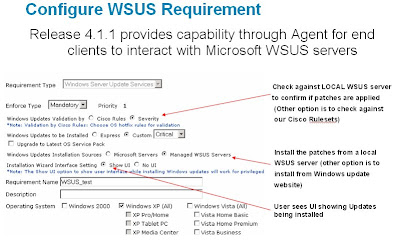
WSUS Requirements are a great new best practice method to ensure Microsoft is truly up to date.
Sources: 4.1(2) CAM Admin Guide; Whats New 4.1(1)
New to 4.1.1, WSUS Requirements gives NAC Appliance administrators the ability to seamlessly integrate with local WSUS servers or utilize Microsoft Servers to ensure users are up to date on their microsoft service packs and patches.
Configuring WSUS Requirements:
The following are a list of options when configuring a WSUS Requirement:
- Update Validation source - This involves checking to see if a particular client machine is up to date with patches. This check can be done against the WSUS server itself OR against Cisco rulesets.
- Cisco Rules - In this case, the new “WSUS Server Update services” requirement needs to be mapped to the standard Cisco rule sets such as XP_hotfixes etc. Standard registry scans will be performed on the client machine based on these rule sets.
- WSUS Server - In this case, the CCA Agent makes an API call to the WSUS Agent on the client machine to check compliance. Since our rule set is not used here (direct interaction between WSUS client and server, no need to map the Rule set to the requirement.
- Update Installation source - This involves remediating the user after we have established that he/she is non-compliant. The remediation can be done either from local WSUS servers OR against WindowsUpdate
- WSUS Servers - Download and Install the patches from the local WSUS servers.
- Windows Update - Download and install patches from Microsoft Windows Update website
- Update Installation type - This involves deciding what type of hotfixes should be downloaded and installed from the chosen source.
- Custom - Use this setting and the associated dropdown menu to install updates based on their severity by choosing Critical, Medium, or All from the associated dropdown menu. If you select Critical only the most severe/critical Windows updates are installed; selecting Medium means all updates (except for those classified as "low severity" by Microsoft) are installed; selecting All means that all of the currently available Windows Updates are installed, regardless of severity.
- Upgrade to Latest OS Service Pack - automatically install the latest service pack available for the user's operating system.
- UI Experience - This setting controls what the end user sees when the Updates are being installedlist of options when
- Show UI - The Windows Update UI (showing that patches are being installed) is displayed to user
- No UI: Updates are done silently and user does not see any UI that shows updates are being installed
Figure 1 - Configuring a WSUS Requirement

- Validation against WSUS server may take between 10-15 seconds
- Make sure Access is opened to WSUS server or Windows update server in the temporary role (depending on what is being used)
- Make sure that the client PC can talk to the WSUS server on port 80/443. These are the ports client machine uses to talk to WSUS server
- WSUS updates may take long. So, it is important to set the Session Timer for the temporary role long enough to allow enough time for the updates to complete.
- In order to support Windows Server Update Services operations, client machines must have version 5.4.3790.1000 (or a more recent version) of the WUAUENG.dll file installed.
- If there are update errors, see C:\Windows\Windows Update.log or C:\Windows\WindowsUpdate.log.
- To see if you have a Local WSUS server configured go to HKLM\SOFTWARE\Policies\Microsoft\Windows\WindowsUpdate and the "WUServer" key will have the server listed.
WSUS Requirements are a great new best practice method to ensure Microsoft is truly up to date.
Sources: 4.1(2) CAM Admin Guide; Whats New 4.1(1)
Monday, August 13, 2007
CAA Requirement Best Practices - Enforce Types
In the world of NAC Appliance, when using the NAC Agent, there are 3 different type of enforcement types. At first look you have the ability to use the following enforce types:
Finally, utilize MANDATORY requirements to ensure that all policy is enforced.
The last major idea that should be taken into account is how to schedule this type of roll out. I typically recommend 30-45 days for AUDIT requirements and then 30-60 days for OPTIONAL requirements, but this must be determined on a per organization basis. The key thing to take from this posting is that you do have this wonderful option to phase the enforcement of policy for your NAC deployment and it will help ensure a smooth transition for administrators and end users. One less talked about configuration option that you can use to make your NAC deployment more successful.
Audit—Silently audit. The client system is checked "silently" for the requirement without notifying the user, and a report is generated. The report results (pass or fail) do not affect user network access.
Optional—Do not enforce requirement. The user is informed of the requirement but can bypass it if desired (by clicking "Next"). The client system does not have to meet the requirement for the user to proceed or have network access.
Mandatory—Enforce requirement. The user is informed of this requirement and cannot proceed or have network access unless the client system meets it.
So why is this so important for NAC Deployments.... This gives administrators the ability to deploy with the least impact as possible. All deployments should start with AUDIT type requirements. By doing this we are able to see how many users are coming onto the network without compliant workstations. From this information we can see if all methods of users getting patches, updates, etc are correctly working. (E.G. if WSUS or EpolicyOrch is not working correctly you will immediately see almost all hosts out of compliance)
Finally, utilize MANDATORY requirements to ensure that all policy is enforced.
The last major idea that should be taken into account is how to schedule this type of roll out. I typically recommend 30-45 days for AUDIT requirements and then 30-60 days for OPTIONAL requirements, but this must be determined on a per organization basis. The key thing to take from this posting is that you do have this wonderful option to phase the enforcement of policy for your NAC deployment and it will help ensure a smooth transition for administrators and end users. One less talked about configuration option that you can use to make your NAC deployment more successful.
Friday, July 20, 2007
VPN Deployments with ASA 8.0
Background:
In this scenario the PIX/ASA has a DMZ interface that is hosting public servers. If we look to the same deployment option as before, it presents a problem: VPN Users are able to get to the DMZ without having to go through NAC. This leave us with a couple of options:

NAC For VPN Users with a ASA 8.X Corporate Firewall/VPN Device with a DMZ:
This is what you all have been waiting for, how does VPN Deployment change with ASA 8.0? It all comes down to one new feature "Restrict Access to VLAN" (also know as VLAN Mapping).
Restrict Access to VLAN—(Optional) Also called "VLAN mapping," this parameter specifies the egress VLAN interface for sessions to which this group policy applies. The security appliance forwards all traffic on this group to the selected VLAN. Use this attribute to assign a VLAN to the group policy to simplify access control. Assigning a value to this attribute is an alternative to using ACLs to filter traffic on a session. In addition to the default value (Unrestricted), the drop-down list shows only the VLANs that are configured on this security appliance.
This configuration option is configured within the Remote Access Group Policy:
 Please note that you must create an DOT1Q trunk and create the VPN DMZ interface using a subinterface for this option to appear. Now that we have a way to ensure VPN users get put onto a specific interface, we are able to deploy the CAS in Virtual Gateway mode and control complete access to VPN Users through NAC. This forces all users to go through NAC before they are allowed to do anything.

Summary:
Cisco's ASA 8.0 software has really made deployments with NAC for VPN Users a lot less complex. Utilizing the VLAN Mapping setting on the ASA is only going to open up doors down the road for even better seamless integration of NAC Appliance into your infrastructure.
Sources: CAS Admin Guide; ASDM Online Help
One common design challenge in the past was how to deploy NAC for VPN Users when the VPN device is also a corporate firewall. This entry will hopefully help you understand the existing ways of deploying NAC for VPN Users and also help you understand how to design NAC for VPN Users with ASA 8.X.
NAC For VPN Users with a standalone VPN Device:
This is the typical deployment for VPN Concentrators, PIX/ASA (for vpn only), and IOS VPN Routers(for vpn only). The CAS is typically and preferred to be deployed in Virtual Gateway Mode. VG allows for zero IP Address changes and only requires the addition of 1 Authentication/Untrusted VLAN. For more information on how to configure NAC for Standalone VPN Devices please see the NAC Appliance (Cisco Clean Access) In-Band Virtual Gateway for Remote Access VPN Configuration Example
Figure 1 - VPN Deployment with a Standalone VPN Device
With this deployment you need to ensure normal internet traffic from corporate users does NOT go through the CAS. In order to accomplish this, the CAS is deployed using Real-IP Gateway and policy based routing is used on the next layer 3 hop from the firewall to send VPN Users traffic to the CAS's untrusted interface.
Figure 2 - VPN Deployment with a 6.X/7.X Corporate Firwall & VPN Device without a DMZ
In this scenario the PIX/ASA has a DMZ interface that is hosting public servers. If we look to the same deployment option as before, it presents a problem: VPN Users are able to get to the DMZ without having to go through NAC. This leave us with a couple of options:
- Block all VPN Users from getting to the DMZ
- Only allow specific services from VPN Users to the DMZ
- Allow everything to get to the DMZ without going through NAC
- Advanced Workaround using NAT on the Core Router (Not recommended)
Figure 3 - VPN Deployment with a ASA 6.X/7.X Corporate Firwall & VPN Device with a DMZ

NAC For VPN Users with a ASA 8.X Corporate Firewall/VPN Device with a DMZ:
This is what you all have been waiting for, how does VPN Deployment change with ASA 8.0? It all comes down to one new feature "Restrict Access to VLAN" (also know as VLAN Mapping).
Restrict Access to VLAN—(Optional) Also called "VLAN mapping," this parameter specifies the egress VLAN interface for sessions to which this group policy applies. The security appliance forwards all traffic on this group to the selected VLAN. Use this attribute to assign a VLAN to the group policy to simplify access control. Assigning a value to this attribute is an alternative to using ACLs to filter traffic on a session. In addition to the default value (Unrestricted), the drop-down list shows only the VLANs that are configured on this security appliance.
This configuration option is configured within the Remote Access Group Policy:
Figure 4 - Restrict Access to VLAN Configuration
 Please note that you must create an DOT1Q trunk and create the VPN DMZ interface using a subinterface for this option to appear. Now that we have a way to ensure VPN users get put onto a specific interface, we are able to deploy the CAS in Virtual Gateway mode and control complete access to VPN Users through NAC. This forces all users to go through NAC before they are allowed to do anything.
Figure 5 - VPN Deployment with a ASA 8.X Corporate Firwall & VPN Device with a DMZ

Summary:
Cisco's ASA 8.0 software has really made deployments with NAC for VPN Users a lot less complex. Utilizing the VLAN Mapping setting on the ASA is only going to open up doors down the road for even better seamless integration of NAC Appliance into your infrastructure.
Sources: CAS Admin Guide; ASDM Online Help
Sunday, July 15, 2007
Timers
Background:
Cisco NAC Appliance is a great method of threat containment by ensuring users' identity and posture, but at what point do you want to ensure that the user whom has once been compliant is still indeed compliant? This is the reason why timers are such an important aspect of any NACA Deployment. This entry will help you to understand the different options within NAC and ensure that you configure what is needed for your deployment.
The Options:
- Certified Device Timer
- Automatically Clear Certified Device List at specific intervals (X number of days)
- May clear devices based on particular CAS, User Role, Auth Provider
- May clear X amount of users at a time
- May create multiple timers to meet your needs
- Session Timer
- An Absolute Timer that is specific to the user role (X number of minutes)
- Applies to both IB & OOB
- Triggers after a preset time to kick users off the online user list
- Heartbeat Timer
- Number of minutes after which a user is logged off the network if a device is non responsive (in-band only)
- CAS sends an ARP request for the client for the set time (L2)
- CAS looks for traffic sourced from the user (L3)
- If proxy arp is enabled then the Heartbeat timer does nothing (L3)
- 5 Minute minimum
Best Practices for the use of Timers:
ALWAYS configure Certified Device Timers to enforce posture assessment after X amount of time for any Layer 2 or Layer 3 Deployment.
Use Heartbeat Timers to automatically remove inactive users when using IB.
Use User Role Session Timers for timeout of the Quarantine/Temporary User Roles and if you have a per role maximum connect time that is less than 1 day.
No matter where you are deploying NAC the discussion of how often you need to re-authenticate/posture assess a user should come up. Hopefully, you will understand the need and plan appropriately for you deployment.
For more information on how to configure these timers, please read the CAM Admin Guide or for hands on experience and instruction, please consider taking Priveon's Cisco NAC Appliance Special Operations Class.
Thursday, June 21, 2007
Managed Subnets
Background:
The most misunderstood topic of the configuration of NACA is Managed Subnets. Every time I get a call about a LAN deployment, which is not working, the first thing I say is "Managed Subnets!". Hopefully, by reading this you will start to understand the taboo term and know when/where to configure Managed Subnets.
Managed Subnets Theory:
"For all CAS modes in L2 deployments (Real-IP/Virtual Gateway) when configuring additional subnets, you must configure Managed Subnets in the CAS so that the CAS can send ARP queries with appropriate VLAN IDs for client machines on the untrusted interface."
The first question you must ask during deployment is "are there more than one VLAN on the untrusted side of the CAS?" If so, you need to give the CAS "logical interfaces" so that the CAS can "manage" those vlans/subnets. The best way to think about managed subnets is to think about a "router on a stick" deployment; A single interface has multiple sub-interfaces in order to reduce the quantity of physical interfaces on the router. This concept can be applied to the CAS. The CAS uses DOT1Q trunking to logically manage multiple subnets. Why does the CAS need to do this? The CAS needs to be able to communicate with the clients on each of the subnets connected to it untrusted interface. This includes things like Web Redirection, SWISS Protocol, etc. The first step in communication is being able to arp and without managed subnets the CAS cannot arp for the clients off of its UnTrusted interface.
When to use Managed Subnets:
"Managed Subnets are only for user subnets that are Layer 2 adjacent to the CAS. For all CAS modes in L3 deployment, Static Routes must be configured for the user subnets that are one or more hops away. Managed subnets should not be configured for these subnets. "
This logic can be used for In-Band/Out-of-Band, Real-IP/Virtual Gateway, Central/Edge Deployments. If you are a newbie to NACA please review the NACA ChalkTalks(CCO Login Required) before thinking too much into this.
How to configure Managed Subnets:
Managed Subnets are configured for each CAS at Device Management - Clean Access Server - manage X.X.X.X - Advanced - Managed Subnet
There are four configuration fields:
IP Address - This value varies based on the type of deployment:
Subnet Mask - Mask for the ip address used above.
VLAN ID - This is the VLAN ID of the UnTrusted VLAN. EVEN when using Virtual Gateway.
Description - Let remember that the next engineer might not understand managed subnets and needs to read this to get a better understand. Use best practice descriptions.

Summary:
Managed Subnets are something that are overlooked a lot, but after you take the time understand them, they really are just another check on the deployment checklist. Make sure that the next time you are practicing NACA, create a lab scenario that requires managed subnets! Cheers!
Source: CAS Admin Guide
The most misunderstood topic of the configuration of NACA is Managed Subnets. Every time I get a call about a LAN deployment, which is not working, the first thing I say is "Managed Subnets!". Hopefully, by reading this you will start to understand the taboo term and know when/where to configure Managed Subnets.
Managed Subnets Theory:
"For all CAS modes in L2 deployments (Real-IP/Virtual Gateway) when configuring additional subnets, you must configure Managed Subnets in the CAS so that the CAS can send ARP queries with appropriate VLAN IDs for client machines on the untrusted interface."
The first question you must ask during deployment is "are there more than one VLAN on the untrusted side of the CAS?" If so, you need to give the CAS "logical interfaces" so that the CAS can "manage" those vlans/subnets. The best way to think about managed subnets is to think about a "router on a stick" deployment; A single interface has multiple sub-interfaces in order to reduce the quantity of physical interfaces on the router. This concept can be applied to the CAS. The CAS uses DOT1Q trunking to logically manage multiple subnets. Why does the CAS need to do this? The CAS needs to be able to communicate with the clients on each of the subnets connected to it untrusted interface. This includes things like Web Redirection, SWISS Protocol, etc. The first step in communication is being able to arp and without managed subnets the CAS cannot arp for the clients off of its UnTrusted interface.
When to use Managed Subnets:
"Managed Subnets are only for user subnets that are Layer 2 adjacent to the CAS. For all CAS modes in L3 deployment, Static Routes must be configured for the user subnets that are one or more hops away. Managed subnets should not be configured for these subnets. "
Layer 2 Deployment = Managed Subnets
Layer 3 Deployments = Static Routes
Layer 3 Deployments = Static Routes
This logic can be used for In-Band/Out-of-Band, Real-IP/Virtual Gateway, Central/Edge Deployments. If you are a newbie to NACA please review the NACA ChalkTalks(CCO Login Required) before thinking too much into this.
How to configure Managed Subnets:
Managed Subnets are configured for each CAS at Device Management - Clean Access Server - manage X.X.X.X - Advanced - Managed Subnet
There are four configuration fields:
IP Address - This value varies based on the type of deployment:
- Real-IP Gateway: Think of router on a stick. This ip address will be the Default Gateway for the clients on the UnTrusted VLAN.
- Virtual Gateway: This needs to be an UNUSED IP address on the network.
VLAN ID - This is the VLAN ID of the UnTrusted VLAN. EVEN when using Virtual Gateway.
Description - Let remember that the next engineer might not understand managed subnets and needs to read this to get a better understand. Use best practice descriptions.
Figure 1 - Sample Managed Subnet

Summary:
Managed Subnets are something that are overlooked a lot, but after you take the time understand them, they really are just another check on the deployment checklist. Make sure that the next time you are practicing NACA, create a lab scenario that requires managed subnets! Cheers!
Source: CAS Admin Guide
Subscribe to:
Posts (Atom)